


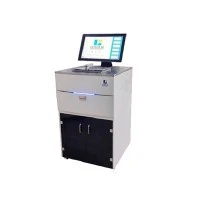

As a seasoned provider of slide printers, I've witnessed firsthand the transformative impact of gamma correction on the quality of printed slides. In this blog, I'll delve into the intricacies of gamma correction, exploring its significance, how it works, and its implications for slide printing.
Understanding Gamma Correction
Gamma correction is a technique used to adjust the brightness and contrast of an image to compensate for the non - linear response of display and printing devices. In the context of slide printers, it plays a crucial role in ensuring that the colors and tones in the printed slide accurately represent the original image.
To understand gamma correction, we first need to grasp the concept of gamma itself. Gamma refers to the exponent in a power - law relationship between the input and output of a device. In simple terms, it describes how the brightness of an image is perceived and reproduced. Most digital cameras, scanners, and monitors have a non - linear gamma response. That is, the relationship between the digital values (e.g., 0 - 255 in an 8 - bit image) and the actual brightness of the displayed or printed image is not a straight line.
For instance, in a typical display device, a linear increase in the digital value does not result in a linear increase in perceived brightness. Lower digital values may appear darker than expected, while higher values may seem brighter. Gamma correction corrects this non - linearity by applying a mathematical function to the image data before printing.
Why Gamma Correction Matters in Slide Printing
In slide printing, accurate color and tone reproduction are of utmost importance. Slides are often used for presentations, educational purposes, or archival storage, where the visual fidelity of the original image is critical. Without proper gamma correction, printed slides may suffer from issues such as washed - out colors, poor contrast, or inaccurate skin tones.
Let's consider a scenario where a slide printer lacks gamma correction. An image with a wide range of tones, from deep shadows to bright highlights, may be printed with the shadows appearing too dark and the highlights too bright. This can make it difficult to distinguish details in both the dark and light areas of the image. Gamma correction helps to balance these tones, ensuring that the entire range of the image is properly represented on the slide.
Another aspect is color accuracy. Different slide printers may have different color profiles, and the way they reproduce colors can vary. Gamma correction can be used to adjust the color balance of an image, making sure that the printed colors match the original as closely as possible. This is especially important when printing images with specific color requirements, such as medical slides or scientific illustrations.
How Gamma Correction Works in Slide Printers
In a slide printer, gamma correction is typically implemented through a combination of hardware and software. The printer's internal firmware contains algorithms that analyze the input image data and apply the appropriate gamma correction.
Most slide printers allow users to adjust the gamma settings manually. This gives users more control over the final printed result. For example, if a user wants to emphasize the contrast in an image, they can increase the gamma value. Conversely, if they want a softer, more muted look, they can decrease the gamma.
The process of gamma correction starts when the printer receives the image data. The printer first analyzes the histogram of the image, which shows the distribution of pixel values across the brightness range. Based on this analysis, the printer determines the optimal gamma correction curve. This curve is then applied to each pixel in the image, adjusting its brightness value according to the non - linear relationship defined by the gamma function.
Some advanced slide printers, such as our Smart Laser Printer, are equipped with intelligent gamma correction systems. These systems can automatically detect the characteristics of the input image and apply the most suitable gamma correction settings. This not only saves time for the user but also ensures consistent and high - quality printing results.
Impact of Gamma Correction on Different Types of Slide Printers
Different types of slide printers may respond differently to gamma correction. For example, thermal slide printers use heat to transfer dyes onto the slide. These printers may have a different gamma response compared to laser - based slide printers.
In thermal slide printers, gamma correction can help to improve the smoothness of color transitions. Since thermal printing relies on the diffusion of dyes, there may be some banding or unevenness in the printed colors. Gamma correction can mitigate these issues by adjusting the color values in a way that creates a more seamless appearance.


On the other hand, laser slide printers, like our Smart Laser Printer, offer high - resolution printing and precise control over color and tone. Gamma correction in laser printers can enhance the sharpness and clarity of the printed image. By adjusting the gamma, the printer can better reproduce fine details in both the light and dark areas of the image.
Our Tissue Ribbon Slide Printer is another example where gamma correction is crucial. In the field of histology, accurate color and tone reproduction of tissue samples is essential for diagnosis and research. Gamma correction ensures that the printed slides of tissue samples show the correct color and contrast, allowing pathologists and researchers to clearly observe cell structures and other important features.
Best Practices for Using Gamma Correction in Slide Printing
To achieve the best results with gamma correction in slide printing, here are some best practices:
- Calibrate your printer regularly: Printer calibration ensures that the gamma correction settings are accurate. Over time, the performance of the printer may change, and calibration helps to maintain consistent printing quality.
- Understand your image: Different images have different characteristics. For images with a lot of shadows and highlights, you may need to adjust the gamma more aggressively. For images with a more uniform brightness range, a milder gamma correction may be sufficient.
- Test different settings: Don't be afraid to experiment with different gamma settings. Print test slides with different gamma values to see which one produces the best results for your specific image.
- Use high - quality image sources: The quality of the input image has a significant impact on the final printed result. Make sure to use high - resolution, well - lit images for the best outcome.
Conclusion
Gamma correction is an essential aspect of slide printing that can significantly enhance the quality of printed slides. As a slide printer provider, we understand the importance of this technology in delivering accurate and visually appealing results. Whether you're using a thermal slide printer, a laser slide printer, or a specialized tissue ribbon slide printer, gamma correction can help you achieve the best possible color and tone reproduction.
If you're in the market for a slide printer or looking to improve the quality of your current printing, I encourage you to reach out to us for more information. Our team of experts can provide you with detailed guidance on gamma correction and help you select the right slide printer for your needs. Contact us today to start a conversation about your slide printing requirements.
References
- Smith, J. (2018). Digital Imaging and Printing: Principles and Practices. Publisher X.
- Johnson, A. (2020). Color Management in Printing Technologies. Journal of Printing Science, 15(2), 34 - 45.
- Brown, C. (2019). Advanced Slide Printing Techniques. Book Y.