




Managing print queues on a slide printer is a crucial aspect of ensuring efficient and smooth operations, especially in a high - volume environment. As a dedicated Slide Printer provider, we understand the challenges that come with print queue management and are here to share some valuable insights and best practices.
Understanding Print Queues
A print queue is essentially a waiting line for print jobs. When you send a print job to a slide printer, it is placed in the print queue until the printer is ready to process it. There can be multiple factors that affect the order in which these jobs are printed, such as the printer's priority settings, the complexity of the print job, and the amount of resources required.
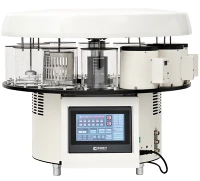
In a laboratory or a medical research setting where slide printers are commonly used, there could be a continuous stream of print requests. These might include tissue ribbon slides, which are often crucial for microscopic analysis. Our Tissue Ribbon Slide Printer is designed to handle such delicate and detailed printing tasks with precision. However, without proper print queue management, delays can occur, which may slow down the entire research process.
Factors Affecting Print Queue Performance
Printer Capacity
The capacity of a slide printer is a significant factor. Different types of slide printers, such as Laser Slide Printer and UV Slide Printer, have different printing speeds and throughput. A laser slide printer generally offers faster printing speeds, which can reduce the time jobs spend in the queue. Understanding the printer's capacity helps in planning and optimizing the print workflow.
Job Complexity
The complexity of the print job also plays a role in queue management. A simple text - only slide print will take less time compared to a slide with high - resolution images or multiple colors. Jobs with more complex requirements should be scheduled accordingly to avoid bottlenecks in the queue.
Priority Settings
Most modern slide printers allow for priority settings. You can assign high - priority to print jobs that are urgent, such as those for time - sensitive research projects or clinical diagnostics. By setting priorities, you can ensure that critical jobs are printed first, reducing the impact of queue delays on important tasks.
Strategies for Effective Print Queue Management
Grouping Similar Jobs
Grouping similar print jobs together can improve efficiency. For example, if you have multiple tissue ribbon slide print jobs that require the same settings, printing them in a batch reduces the time spent on adjusting the printer settings between jobs. This way, the printer can work continuously on a set of similar tasks, minimizing idle time and speeding up the overall printing process.
Scheduling Print Jobs
Scheduling print jobs based on the printer's availability and the urgency of the tasks is another effective strategy. You can set up a schedule where less critical jobs are printed during off - peak hours, while high - priority jobs are scheduled for times when the printer is least likely to be busy. This helps in balancing the workload and preventing long queues from building up during peak times.
Monitoring the Print Queue
Regularly monitoring the print queue is essential. Many slide printers come with built - in software that allows you to view the status of print jobs in the queue, including the estimated time for completion. By keeping an eye on the queue, you can identify any potential issues early, such as a job that is stuck or taking much longer than expected. This enables you to take corrective action promptly, such as canceling a problematic job or re - prioritizing the queue.
Optimizing Printer Software for Queue Management
The printer software plays a vital role in print queue management. Here are some ways to optimize it:
Update Printer Drivers
Outdated printer drivers can cause issues with print queue management. New driver versions often include bug fixes, performance improvements, and new features that can enhance the printer's ability to handle print queues. Make sure to regularly check for driver updates on the printer manufacturer's website and install them as soon as they are available.
Configure Print Settings
Properly configuring the print settings in the software can also improve queue management. You can set default settings for common print jobs, such as resolution, color mode, and paper type. This reduces the time spent on making individual adjustments for each job, streamlining the printing process and reducing queue times.
Troubleshooting Print Queue Problems
Job Stuck in the Queue
If a print job gets stuck in the queue, it can prevent other jobs from being processed. In such cases, try cancelling the stuck job through the printer software. If that doesn't work, you may need to restart the printer and the computer connected to it. Sometimes, a simple restart can clear any temporary glitches in the system.
Printer Not Responding to the Queue
If the printer is not responding to the print queue even when there are jobs waiting, check the connection between the printer and the computer. Make sure the cables are properly plugged in and that the printer is powered on. You can also try restarting the printer and the computer, as well as checking for any error messages on the printer's display.
Advancements in Slide Printer Technology for Queue Management
Technological advancements in slide printers are constantly improving print queue management. Some of the latest features include:


Intelligent Queueing Systems
Modern slide printers are equipped with intelligent queueing systems that can automatically prioritize jobs based on factors such as job complexity and urgency. These systems analyze the print requests and adjust the queue order in real - time, ensuring that the most critical jobs are printed first.
Remote Monitoring and Management
With the advent of Internet of Things (IoT) technology, it is now possible to remotely monitor and manage the print queue on a slide printer. You can access the printer's software from a mobile device or a remote computer, allowing you to view the status of the queue, cancel jobs, and re - prioritize tasks from anywhere.
Conclusion
Effective print queue management on a slide printer is essential for maximizing productivity and ensuring that critical printing tasks are completed in a timely manner. By understanding the factors that affect print queue performance, implementing strategies such as job grouping and scheduling, optimizing printer software, and troubleshooting common problems, you can streamline your printing workflow.
As a leading Slide Printer provider, we are committed to helping our customers get the most out of their printing equipment. Our Tissue Ribbon Slide Printer, Laser Slide Printer, and UV Slide Printer are designed with advanced features to make print queue management easier and more efficient.
If you are looking to improve your slide printing operations and need professional advice on print queue management or are interested in purchasing our high - quality slide printers, we encourage you to contact us for a detailed discussion. Our team of experts is ready to assist you in finding the best solutions for your specific needs.
References
- "Printers and Printing Technology" - A comprehensive guide on printer operation and management.
- Manufacturer's documentation for slide printers, which provides detailed information on print queue management features and settings.
- Industry research reports on the latest trends in slide printer technology and print queue optimization.