




Xiaogan Kuohai Medical Technology Co., Ltd. is one of the most reliable manufacturers and suppliers of ribbon cassette printer in China, featured by quality products and good price. If you're going to wholesale advanced ribbon cassette printer made in China, welcome to get quotation from our factory. Also, customized service and 1 year warranty are available.
Xiaogan Kuohai Medical Technology Co.,Ltd
Xiaogan Kuohai Medical Technology Co.,Ltd. is a rare domestic pathology instrument manufacturing company with a widespread user base throughout China. "Kuohai Medical Technology" owns five subsidiaries, including Hubei Xiaogan Kuohai Medical Technology Co.,Ltd., Xiaogan Kuohai Medical Technology Co.,Ltd., Hubei Haishi Industrial Co.,Ltd., Xiaogan Ruifeng Electronic Technology Co.,Ltd., and Xiaogan Dinghang Decoration Engineering Co.,Ltd. The product range covers industries such as medical instruments, biotechnology, electronic technology, high-end building materials, and decoration engineering. The company is steadily moving towards industrial group development.
Why Choose Us
Rich Experience
Xiaogan Kuohai Medical Technology Co., Ltd. is a rare domestic pathology instrument manufacturing company with a widespread user base throughout China.
High Quality
The product range covers industries such as medical instruments, biotechnology, electronic technology, high-end building materials, and decoration engineering.
Technical Support
Our team of experts is available to assist with troubleshooting, answer technical inquiries, and provide guidance.
Customer Service
We prioritize open communication to address our clients' specific requirements and deliver personalized solutions.
Related Product Introduction

A Pathology Cassette Printer is a device used in clinical laboratories for the automatic printing of patient information onto pathology cassettes. These cassettes are small plastic containers that hold the tissue samples collected for histological examination. The printer allows for the accurate and efficient transfer of patient details, specimen identifiers, and other relevant data directly onto the cassette labels.
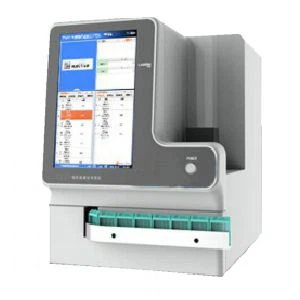
A Tissue Cassette Printer is a specialized piece of equipment found in anatomic pathology laboratories. It is designed to print labels directly onto the cassettes that house tissue samples for processing and microscopic examination. These cassettes are typically made of plastic and are used in various steps of histology workflow, including tissue fixation, embedding, sectioning, and staining.

A Histology Cassette Printer is a dedicated machine designed to print labels onto cassettes used in histology laboratories. These cassettes are utilized to hold tissue samples during various stages of proce/cassette-printer/uv-cassette-printer.htmlssing, including fixation, embedding, cutting into thin sections, and staining for microscopic examination.

A Ribbon Cassette Printer is a type of impact printer that uses a ribbon to transfer ink onto paper or similar substrates. In the context of histology and pathology laboratories, this printer is designed specifically for printing labels onto cassettes that hold tissue samples for processing. The term "ribbon" refers to the colored strip of material coated with ink that is fed through the printer and pressed against the cassette label to produce text and graphics.

A Laser Cassette Printer is a device used in pathology labs for printing labels on histology cassettes, which contain tissue samples for examination under a microscope. Unlike ribbon cassette printers that use an ink-coated ribbon to transfer text and images, laser printers use a laser beam to selectively melt toner onto the label material.

A UV Cassette Printer is an advanced printing solution designed for use in medical laboratories, specifically for printing labels on cassettes that hold tissue samples. The primary characteristic of this type of printer is its use of ultraviolet (UV) light to cure the ink immediately after it is applied to the label. This curing process not only dries the ink instantaneously but also makes the printed labels extremely durable and resistant to smudging, fading, chemicals, and physical damage.
What is Ribbon Cassette Printer
A Ribbon Cassette Printer is a type of impact printer that uses a ribbon to transfer ink onto paper or similar substrates. In the context of histology and pathology laboratories, this printer is designed specifically for printing labels onto cassettes that hold tissue samples for processing. The term "ribbon" refers to the colored strip of material coated with ink that is fed through the printer and pressed against the cassette label to produce text and graphics.
Advantages of Ribbon Cassette Printer
Simple Installation
Simple installation refers to the process of easily configuring a ribbon cassette printer. Ribbon cassette printer are generally easy to set up and install, with straightforward instructions. It enables users to start printing quickly without much technical knowledge.
Intuitive Controls
Intuitive controls refer to user interfaces on a ribbon cassette printer designed to be easily understood and operated without requiring extensive instructions or prior experience. Most modern ribbon cassette printer come with user-friendly interfaces and controls, such as touchscreens or simple button layouts, making it easy for users to navigate settings and options.
Wireless Connectivity
Wireless connectivity is communicating and interacting with other devices, like computers, smartphones, or tablets. Many ribbon cassette printer offer wireless connectivity options, allowing users to print from multiple devices without cables or direct connections, enhancing convenience and flexibility.
Energy-Efficient Features
Energy-efficient features in ribbon cassette printer are designed to minimize energy consumption during operation, standby, and idle modes. By incorporating these features, ribbon cassette printer can help limit environmental impact, save running costs, and consume less energy without sacrificing performance or print quality.
Types of Ribbon Cassette Printer
Dot Matrix Printers
Dot matrix printers hit a print head against an ink-soaked ribbon to transfer ink onto the paper, much like a typewriter. These devices feature print heads with various tiny pins, typically in 9, 18, or 24-pin configurations. The more pins there are, like in the 24-pin models, the better and sharper the print quality.
The ink in dot matrix printers is supplied via a fabric ribbon. This ribbon is like a long loop that fits into a cartridge. Dot matrix printers can handle different types of paper. They generally have two types of paper feed mechanisms – Friction feed and Tractor feed.
Friction feed is suitable for standard paper types, providing a versatile option for everyday printing needs. Tractor feed, distinguished by tiny holes along the paper's edges, is designed for specialised paper. This method is particularly valuable for printing on multipart forms or documents requiring precise alignment, thanks to its ability to maintain consistent paper positioning.
The print resolution of dot matrix printers varies but generally peaks at around 240 dots per inch (DPI). Dot matrix printers do not provide super high-resolution results, but they're perfect for printing forms needing carbon copies.
Daisy - Wheel Printers
Daisy wheel printers have a distinctive mechanism known as a "daisy wheel." This is a metal disk adorned with "petals" around its circumference, where each petal carries a different character, such as letters, numbers, or symbols.
The printer rotates this wheel during printing to align the desired character with the paper. An electric hammer then propels the selected petal forward, striking it against an ink ribbon. This action transfers the character's imprint onto the paper, producing the printed text or symbols reminiscent of the output from a ball-head typewriter.
Daisy wheel printers are strictly text-oriented, lacking the capability to print graphics. One must replace the entire wheel with another, featuring a different font style to change fonts.
Line Printers
Line printers are high-speed impact printers that use electromechanical methods to print an entire line of text at a time. They feature rotating chains, bands, or drums with raised characters that transfer the text to the paper when struck against an inked ribbon by a moving hammer mechanism.
Chain Printers
Chain printers feature a dynamic mechanism where a chain, adorned with all the essential characters for printing, moves continuously around two pulleys. This chain traverses horizontally across the print area. During its journey, an electromechanical hammer selectively strikes the characters against an ink ribbon. This action impresses the character's image onto the paper, completing the print.
Band Printers
Band printers, while sharing similarities with chain printers, distinguish themselves using a steel band instead of a chain. This band is embossed with characters along its entire length. It moves horizontally across the print line, facilitating the printing process.
As the band makes its way through the printer, electromechanical hammers precisely time their strikes. They press the paper against the band exactly when a character aligns with the printing position. This method efficiently transfers ink from a ribbon onto the paper, enabling rapid and effective printing that's ideal for handling large volumes of work.
Drum Printers
Drum printers operate using a cylindrical drum that rotates at high speed. The surface of the drum is embossed with the entire character set in each print position.
How to Choose Ribbon Cassette Printer
Determine your needs
Before choosing the right ribbon cassette printer, identify your organization's printing, copy, and scanning needs. Determine the volume of printing required, the types of documents needed, and whether color printing is necessary. Consider the paper handling capabilities of the ribbon cassette printer, such as the size and capacity of the paper trays. Knowing your printing needs will help you choose the right ribbon cassette printer for your organization.
Sustainability
Choosing a sustainable ribbon cassette printer can reduce environmental impact by using fewer resources and operating more efficiently. It is ideal to look for ribbon cassette printer with sustainable features such as 'energy-saving' and eco-friendly settings, 'auto paper adjustment' to avoid print or copy mistakes, two-sided (duplex) print to reduce paper consumption, hold print to avoid paper wastage and other features promoting sustainability.
Connectivity
With the rise of digitalization and hybrid work styles, employees are more fond of web and mobile connectivity. Ribbon cassette printer with the capability to connect with cloud-based services can streamline document management processes. This means that your team can easily scan, print, and share documents with each other, all from a centralized platform. With a mobile-connected ribbon cassette printer, users can quickly print documents without having to go through a computer or other devices. This can save time, leading to increased efficiency in your organization.
Security
Ribbon cassette printer can be a target for cybercriminals who want to gain access to your organization's network. By having a ribbon cassette printer with robust security features, you can ensure that information is protected from unauthorized access, theft, or data breaches. This can help your organization maintain compliance with industry regulations.
Cost of Ownership
Consider the total cost of ownership of the ribbon cassette printer, including the initial cost, ongoing maintenance, and ink or toner replacement costs. A ribbon cassette printer that requires costly ink replacement may not be cost-effective in the long run. Look for a ribbon cassette printer with essential features such as scanning, copying, faxing, and duplex printing. A multifunctional ribbon cassette printer with these features can save your organization money, eliminating the need to purchase separate devices for each task.

How to Operate the Ribbon Cassette Printer
The moment you press print on your computer, tablet or mobile device, the information is sent to the printer memory, where the data is stored temporarily.
The printer begins to warm up. This is the point where you usually need to wait, and it's because the corona wire is heating up and getting ready to pass its positive static charge to the drum.
As the drum (coated metal cylinder) begins to roll, it received a positive charge across its whole surface. Some printers contain four drums, one for each colour – Cyan, Magenta, Yellow & Black.
The laser activates, and beams against a series of mirrors to reflect across the surface of the drum(s) imprinting the shape of your print using an opposite negative electrical charge.
The toner cartridge and hopper sat next to the drum(s) slowly releases positively charged carbon toner particles on to the drum as it turns. The toner is attracted to any areas of negative charge leaving positively charged areas of the drum untouched.
The transfer belt rolls the paper through the printer giving it a positive charge. As it passes the drum, the negatively charged toner is attracted to the page in the shape of your print.
The toner is then melted to the paper by hot rollers called the fuser unit, and voila, your page is printed.
Toner Cartridge
A toner cartridge contains coloured or carbon / iron oxide powder (toner) that is positively charged, and then melted onto the paper. Toner Cartridges are a consumable item that needs to be replaced in a laser printer once the cartridge is empty and is available in 4 different colours black, cyan, magenta and yellow (CMYK).
Drum unit
A drum unit is a metal cylinder that has a special coating (green colour) That can receive a static positive and negative electrical charge from the laser within a laser printer. The drum can be seen in the printer as a green cylinder and can sometimes be built into the toner cartridge rather than a standalone unit.
The drum receives its initial static charge from the corona wire which is heated during the printer warm up process.
Laser
The laser part of the printer transmits light from the diode across a series of mirrors. They reflect the laser onto the drum unit to imprint the shape of the intended print.
Transfer belt
The transfer belt moves the paper through your printer and passes it across the drum so that the toner can be transferred. Some smaller printers do not have a transfer belt but instead have rollers that act in the same way as a belt.
Fuser unit
The fuser unit is a heated roller that melts the toner particles onto the page as it passes through. This seals the toner to the page so it's no longer in powder form and makes sure that the toner doesn't smudge of fall off the paper when it comes out of the printer.
How to Install a Ribbon Cassette Printer
Lots of printers can be very finicky, and if you have an installation guide you should follow its exact instructions before deferring to these general instructions. You can usually find the installation guide as a PDF file on the manufacturer's support page for your model.
Plug the printer into your computer. Make sure to plug it into a USB port directly on your computer, and not a USB hub.
Turn the printer on. You should hear the page feed mechanism start and the printer should light up.
Wait for your operating system to detect and install the printer. All modern versions of Windows and OS X should be able to automatically detect the printer and install the necessary drivers for you. You may need to be connected to the internet in order for your operating system to download the appropriate files. For most users, this should be all you need to do in order to begin printing from your computer to your new printer. If you are using an older version of Windows/OS X, or the printer is not automatically detected, read on.
Install the software that came with the printer. This will usually install any drivers that weren't installed automatically by Windows, and may install extra printing software that allow you to take advantage of additional features on your printer. If you don't have the disc that came with the printer, and it wasn't automatically detected by your operating system, read on.
Download the drivers from the manufacturer's website. If you don't have the disc and the printer wasn't installed automatically, you can download the drivers directly from the manufacturer. You will need to know your printer's model number, which should be prominent on the printer itself.
Run the downloaded drivers. After installing the drivers, your printer should now be ready to print from any program on your computer that supports printing.
Ribbon Cassette Printer Maintenance Tips
Use your printer more frequently
If you don't use your printer regularly the ink cartridge can dry up and cause various obstacles for your business or home based office.Laser printers use heat to fuse the powder onto paper which means the powder in the cartridge cannot dry up.
Prevent printer break downs and clean your printer head
High standard printing is an essential part of a successful business that is why maintaining your printer performance is important. Any machine irrelevant of which model it is can break down if you don't take proper care of it especially when using an inkjet printer.
Take caution when replacing your cartridges
It happens that you are in a hurry to print a document and need to replace your cartridges so you just force them in your printer! Caution must be exercised when replacing cartridges. Do not touch the bottom of the cartridge because it may spoil the quality of your printouts. If your printer is new to you, read the instructions carefully before replacing the cartridges and keep the instruction manual safely.
Keep your printer clean and dust free
Dust your printer off once in a while. Dust and dirt can easily get into the smaller parts of your printer. Dust off your printer with a clean soft cloth or by using a mild alcohol cleaning solution. If you don't use your printer regularly consider covering it with a dust net to prevent dust and dirt getting into it.
Use the latest software and drivers
Updating to the latest software and drivers is more important than you might think. Keep up to date by installing the latest drivers from the manufacturers. This will help you keep your printer in a good working condition. Not sure where to find the latest drivers? Have a look on the manufactures website.
Keep the glass clean
Multi-function printers usually have two pieces of glass (a large one and a long skinny piece) underneath the document feeder. Cleaning the glass regularly will reduce the chances of having lines or dots appear on your copies and scans. We recommend using a good glass cleaner and paper towel. After cleaning, make sure the glass is completely dry before using the machine.
Check the paper tray for debris and other contaminants
Our technicians have been called to the rescue many times for printer issues that occurred because foreign materials got pulled into the paper feed. This happens when dirt and debris fall into the paper tray when loading paper into the printer. Avoid unwanted emergency service calls by checking the tray after loading paper-or even before each use for extra peace of mind.
FAQ
Hot Tags: ribbon cassette printer, China ribbon cassette printer manufacturers, suppliers, factory, Tissue Cassette Printer, Laser Cassette Printer, Cassette Printer, Histology Cassette Printer, UV Cassette Printer, Ribbon Cassette Printer


